-
Shop
- Advanced Technologies
- AI Career Advantage Collection
- Apple Accessories
- Bathroom
- Best Sellers
- Black Friday Sale
- Car Accessories
- Digital Products
- Digital Resources
- Fashion
- Furniture
- Gadgets
- Gift Ideas
- Health & Beauty
- Home
- Home & Garden
- Home Decor
- Home Electronics
- Home Supplies
- Independence Day
- Kitchen
- Lighting
- Mother’s Day
- Patio, Lawn & Garden
- Pet Supplies
- Pets
- Samsung Accessories
- Special Deals
- Sport & Outdoors
- Super Deals
- Travel & Outdoors
- Watches
- New arrivals
- Featured
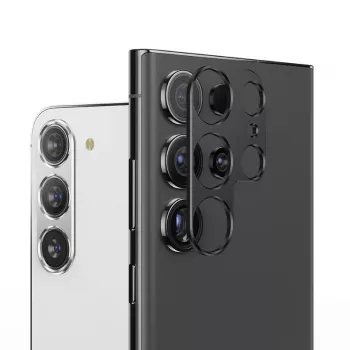
Aluminum Camera Lens Protector for Galaxy S24 Ultra/S24+

Aluminum Metal Rear Camera Lens Protector for Samsung Galaxy S24 Ultra/S24+
A small bump, pocket grit, or a quick drop can leave the camera area scuffed—especially on phones with raised multi-lens modules. An aluminum metal rear camera lens protector adds a rigid shield around the camera cluster while keeping everyday photos and videos clear. If you rely on your Galaxy S24 Ultra or S24+ camera for work, travel, or family moments, protecting the module is a simple upgrade that helps your phone stay looking (and shooting) like new. For more guidance, see Samsung Galaxy S20 Glass Camera Panel Prone to ….
What This Protector Does (and What It Doesn’t)
Camera modules take a lot of real-world abuse: sliding across tables, brushing against keys, and collecting fine dust that acts like sandpaper. A metal lens protector focuses on shielding the most exposed area without changing how you use the phone day to day. For further reading, see Samsung Galaxy S22 Ultra camera design update.
- Adds a firm outer barrier around the rear camera area to help reduce damage from knocks and abrasion.
- Helps keep dust and grit from rubbing directly against the camera lens surfaces during pocket or bag carry.
- Designed to preserve normal camera operation (flash, focusing, and camera switching) when properly aligned.
- Not a substitute for a protective phone case—best results come from using both together.
- Not intended to fix an already cracked lens; it helps prevent new damage and may reduce further scratching.
If you’re shopping for a straightforward option built to take daily wear, see the Aluminum Metal Rear Camera Lens Protector for Samsung Galaxy S24 Ultra/S24+.
Fit and Compatibility Checklist
Precision matters most around camera clusters. A protector that’s slightly off can cause flash glare, block a sensor, or sit unevenly under a case.
- Confirm the exact phone model: Galaxy S24 Ultra vs S24+ have different camera layouts and spacing.
- Check for case clearance: some tight camera-bump cases can interfere with metal rings or frames around lenses.
- Look for precise cutouts so the flash and any sensors are not shadowed or partially blocked.
- If a lens protector is used with a case that has a raised camera lip, verify that both can sit flat without lifting at the edges.
Quick Compatibility Checks
| Check | What to Look For | Why It Matters |
|---|---|---|
| Phone model match | S24 Ultra/S24+ listed explicitly | Misfit can cover sensors or leave edges exposed |
| Case clearance | No contact or pressure at the camera bump | Prevents peeling and keeps alignment stable |
| Flash/sensor cutouts | Unobstructed windows | Avoids glare, shadows, and focus issues |
| Surface condition | Clean, dry glass and module area | Improves adhesion and long-term hold |
Materials and Build: Why Aluminum Helps
Many protectors rely solely on thin films, but aluminum brings a different kind of defense: rigidity. When a phone is set down on a rough surface or takes a small corner hit, a metal frame can help spread that contact and reduce direct impact to the edges of the lens area.
- Aluminum offers rigid impact distribution, helping protect the camera area from direct knocks.
- A metal frame can also reduce edge chipping and scuffing compared with thin film-only options.
- A well-finished surface resists oxidation and keeps the camera area looking cleaner over time.
- Comfort note: metal parts can feel cooler to the touch and may add a slight raised edge around the module.
Modern phones already use durable glass technology, but “durable” isn’t the same as “scratch-proof.” For background on strengthened cover glass, see Corning Gorilla Glass.
Photo and Video Quality Considerations
A well-aligned protector should be visually “invisible” in your results, but camera performance depends on clean optics and clear paths for the flash and sensors. Most quality complaints trace back to installation dust, fingerprints, or flash reflections.
- Keep any glass windows (if included) spotless—smudges are a more common cause of haze than the protector itself.
- Avoid protectors that introduce reflections around the flash; proper cutout and matte finishing reduce flare risk.
- If night photos show halos or glare, re-check alignment and cleanliness, and ensure the flash opening is fully clear.
- Use a microfiber cloth and camera-safe cleaning solution; avoid abrasive wipes that can scratch coatings.
If you need official device care guidance or troubleshooting steps, Samsung Support is a reliable reference.
Installation Steps for a Clean, Secure Fit
Installation is quick, but the small details determine whether the protector stays put and whether your camera stays crystal clear.
For phones that are already damaged, DIY attempts can sometimes make things worse. If you’re evaluating repair options, iFixit’s smartphone repair guides are a helpful starting point for understanding what’s involved.
Everyday Care and When to Replace
Good Pairings for Daily Use
For commuting and travel, pairing your camera protection with a compact cable like the 66W 5A Fast Charging Spring Retractable USB Type C Cable – For Car & On-the-Go helps keep charging simple without tangles.
FAQ
Will a metal camera lens protector affect photo quality on the Galaxy S24 Ultra or S24+?
When properly aligned and kept clean, it should not noticeably affect photos or video. Most issues come from smudges, dust trapped during installation, or flash cutouts that cause reflections at night.
Can a camera lens protector be used with a phone case?
Usually yes, but clearance matters. Check that the case does not press on the protector or lift its edges; if it does, choose a case with a wider camera opening or a less bulky protector design.
What should be done if the camera area is already scratched or cracked?
A protector can help prevent additional scratching, but it won’t repair cracks. For cracked lens glass or persistent blur, professional service is often the safest path, since installing over damaged glass can trap debris and worsen image artifacts.
Recommended for you
MacBook Air Drop Damage: What to Expect & Prevent
Jul 19, 2026













Leave a comment